Apps you recognize.
Open apps appear automatically. Add an exception whenever an app is in use or only in fullscreen. No hunting for an .exe file.
 Night Light MonitorLight on your terms
Warm light when you want it. Your own colors when they matter. With exceptions for each app and display, you stay in control of your desktop.
v0.9.0 · Windows x64 · no installation needed · 162 MBNight Light Monitor 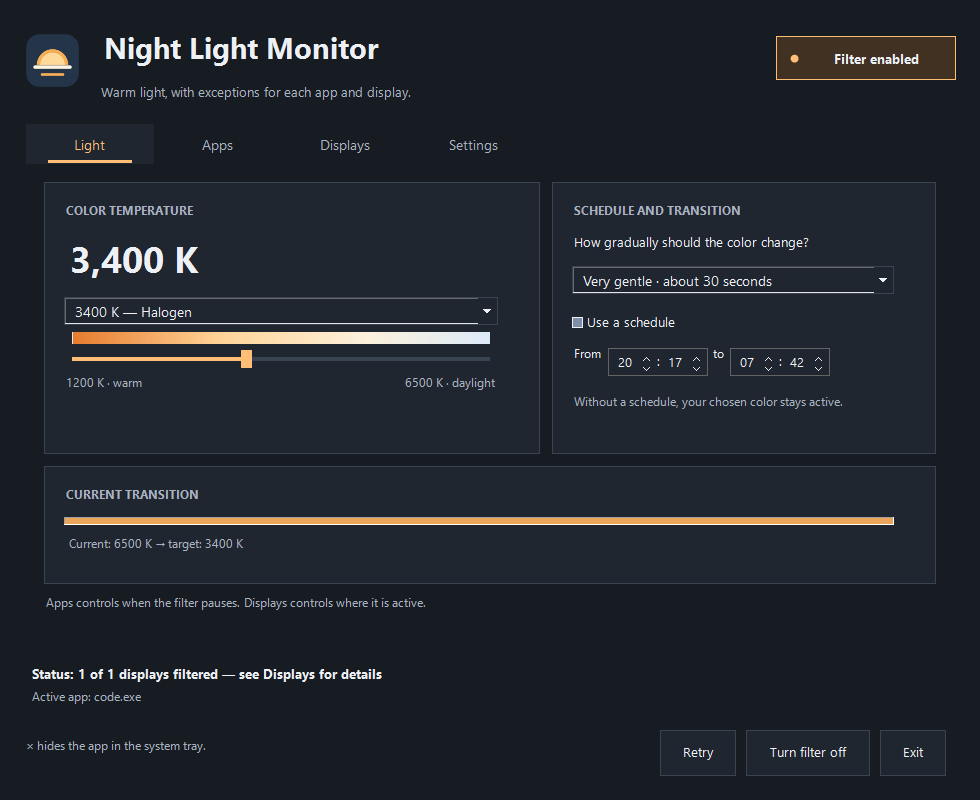
From your first tab to your last game: decide where and when the light changes.
Open apps appear automatically. Add an exception whenever an app is in use or only in fullscreen. No hunting for an .exe file.
Keep your work display warm while your game runs on its own display without our filter. Or pause across all displays at once. You choose the scope.
Choose from 1200 K to 6500 K and set your transition. Use a schedule or pick the temperature yourself. Your preferences are saved.
A fullscreen game does not have to turn off the filter on your other display. Link an exception to the app’s display and restore its previous color setting there.
Make it your evening ↗Visual illustration. The slider changes only this example.
Download the standalone Windows app. Open the file, choose your temperature, and set your exceptions. No account needed.
The practical details before you soften the light.
No. The standalone x64 build includes the required .NET runtime. Open the .exe directly, or extract the ZIP and open NightLightMonitor.exe. The × button hides the app in the system tray; choose Exit to stop it.
The app saves the existing color setting and calculates its filter from that baseline. An exception or disabling the filter restores its own changes and checks the result by reading it back. Other color software and the display driver can affect the final appearance.
Separate display control applies to supported SDR displays. HDR, cloned outputs, and unknown display identities are skipped. This is a preview; compatibility with every graphics card and exclusive fullscreen game has not been established.
The download is not digitally signed yet, so Windows SmartScreen may show a warning. Download only from this domain and, if desired, check the SHA-256 below before opening the file.
This is the SHA-256 of this version’s .exe file. Compare it with Get-FileHash in PowerShell to check that you downloaded exactly the same file.
92524db3b3df445fc45470fb651c74038222edc31dc0b01b355bdf2d7d9daaf9